As many of you have read, I prepared a one-hour webinar for a national education company titled “Digital Note-Taking Tips and Techniques” and plan on sharing parts of the webinar. I am in the process of putting together 7 “Tips and Techniques” about Information Management. The great thing about building this presentation is that I am talking about FREE programs and apps.
Too many times an app or program gets you hooked with basic features and benefits then if you want the balance of the product it costs you! Apple Notes and Google Keep are both free, plus Keep can be loaded on Apple devices. I think having both Notes and Keep available on all your Apple devices makes sense so you can utilize features you like from both. We know Apple and Google are always attempting to one up each other with not only programs but also features within the program. I took a quick look at Apple’s next operating system due out soon and features they are adding to Notes. I’m sure Google Keep is going to do their best to not only keep up with but also pass Apple. Between Apple Notes and Google Keep there are currently so many hidden features many of us don’t know exist. I plan on covering a few in my series and updating from time to time!
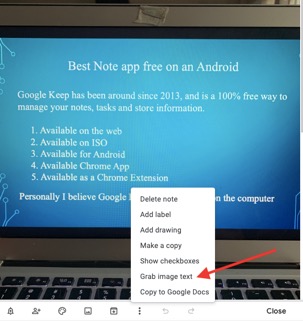
My first share is a feature I love on Google Keep, “Grab Image Text.” Oh, the uses are endless on this one. If you are attending something and they are displaying a slideshow, take a picture. Need info from a document? Take a picture. See a poster about an up and coming event? Take a picture. See an announcement on TV or your computer? Take a picture. Somebody hands you a business card, take a picture. I’m sure you get the picture–sorry I couldn’t resist! Here is an example I did using my computer with a PowerPoint slide on my screen:
 |
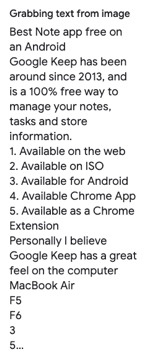 |
As you can see it also pulled info from my keyboard. Keep is available from the App Store and Google Play. I personally have Keep on all my Apple devices and use this feature and a few other features regularly, which I will be sharing. More tips coming and will be loading them both as a JPEG and PDF on my Facebook page, “Dick Betts Blogs”.
For years, I taught and preached Time and Contact Management to help you become organized. Today we are on information overload and need a system in place to know where to find all the information. I am putting Information Management up there with both Contact and Time Management. Please feel free to share and if somebody wants to use in a newsletter or other publication, let me know; I would be happy to work with them!