AI image editing tools have evolved far beyond simple filters and automatic enhancements. Instead of manually adjusting layers, masks, and color settings, modern platforms increasingly allow users to describe the edits they want using natural language. The Pollo AI photo editor follows this approach by combining image editing, enhancement, background manipulation, and AI generation into a single workflow.
This review examines how the Pollo AI photo editor works, its major features, real-world performance, and whether it offers enough value for different types of users.
What Is Pollo AI Photo Editor?
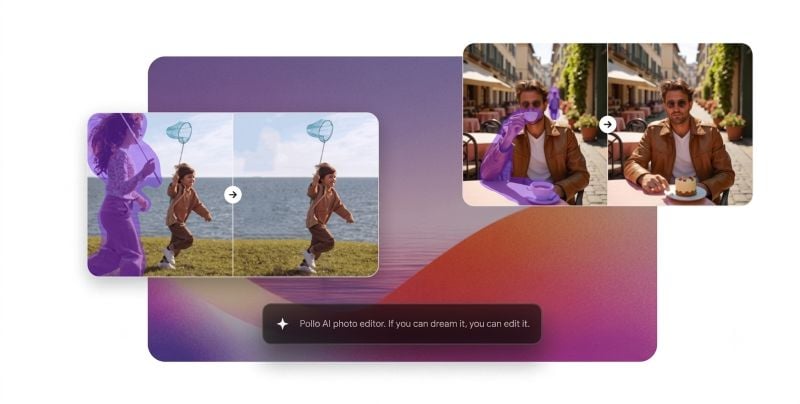
Pollo AI photo editor is an AI-powered image editing platform that enables users to modify photos using simple text prompts. Rather than relying on traditional editing techniques, users can describe desired changes in natural language, and the AI interprets those instructions to transform the image accordingly.
For example, users can type requests such as "remove the background," "add warm sunset lighting," or "turn this photo into a watercolor painting." The AI then applies the requested changes automatically.
This approach makes image editing significantly more accessible to users who may not have experience with professional design software. The platform is designed for content creators, marketers, e-commerce sellers, designers, and everyday users looking for faster editing workflows.
One notable aspect of the Pollo AI photo editor is its accessibility. Users can start experimenting with the platform through free daily credits before deciding whether a paid subscription is necessary.
What Features Power Pollo AI Photo Editor?
Text to Edit
The most distinctive feature of the Pollo AI photo editor is its text-to-edit workflow. Instead of manipulating pixels manually, users simply describe what they want changed. Similar to how an AI image generator creates visuals from text prompts, the editor interprets natural-language instructions and applies the requested modifications automatically. This natural language editing system can dramatically reduce the time required for routine image adjustments while making advanced editing techniques accessible to beginners.
Image Enhancement
Image enhancement is one of the platform's primary capabilities. Users can improve image quality, sharpen details, increase resolution, refine lighting, and optimize colors through AI-powered processing.
These tools can be useful for upgrading low-quality photos, improving smartphone images, or preparing visuals for professional use.
Background and Object Removal
The platform includes automatic background removal and object erasing tools. Users can remove distracting elements, isolate products, or replace existing backgrounds with entirely new environments.
For online sellers, this functionality can simplify the process of creating clean, catalog-ready product images without requiring studio photography.
Batch Editing
A feature that distinguishes the platform from many basic AI editors is its ability to edit multiple images simultaneously.
Rather than processing photos one by one, users can upload entire groups of product photos, campaign assets, or social media images and apply consistent edits across all files. This can significantly improve workflow efficiency for businesses managing large image libraries.
Visual Consistency
Consistency is often a challenge when editing large numbers of images. The Pollo AI photo editor allows users to maintain similar backgrounds, lighting conditions, color palettes, and styles across multiple assets.
This capability can be particularly valuable for brand marketing, e-commerce catalogs, and social media campaigns where visual cohesion is important.
How Does Pollo AI Photo Editor Work?
Step 1: Upload and Describe
Users begin by uploading an image into the Pollo AI photo editor. A text prompt is then entered to explain the desired changes.
The prompt can be simple or detailed depending on the complexity of the edit.
Step 2: Choose Editing Preferences
After entering instructions, users can select available AI models and customize certain settings depending on the chosen editing task.
This stage allows greater control over the final output while preserving the platform's user-friendly workflow.
Step 3: Generate and Download
Once the AI processes the request, the edited image is generated automatically. Users can then review the results and download the final image in high resolution.
The entire process typically takes only a short amount of time compared with traditional editing workflows.
How Well Does Pollo AI Photo Editor Perform?
The Pollo AI photo editor was evaluated across several common editing scenarios, including product photo cleanup, portrait enhancement, object removal, and batch editing. Overall, the platform delivered solid results for everyday content creation and marketing tasks.
Product Photo and Portrait Editing
In a product photo test, the prompt "remove the background and create a clean white product photo" produced a professional-looking result with accurate subject detection and clean edges. Similarly, a low-light portrait became noticeably brighter and sharper after AI enhancement while maintaining natural skin tones.
These results suggest that the Pollo AI photo editor performs particularly well for e-commerce listings and social media content.
Object Removal and Style Transformation
When removing unwanted objects from background scenes, the AI generally reconstructed surrounding areas convincingly. Minor imperfections occasionally appeared in more detailed environments, but the edits were suitable for most online uses.
Style transformation tests also showed good prompt adherence. Requests such as watercolor or cinematic effects produced visually distinct results while preserving the main subject of the original image.
Batch Editing Performance
One of the platform's strongest areas is batch editing. When the same enhancement settings were applied to multiple product photos, the images maintained a consistent appearance across lighting, colors, and overall style.
This capability can help businesses and marketers process large image collections more efficiently.
Overall Assessment
The Pollo AI photo editor performs best in image enhancement, background removal, and batch processing tasks. While complex scenes may occasionally require additional refinement, the text-to-edit workflow makes image editing significantly faster and more accessible than traditional software for most users.
Some Limitations Remain
Like most AI-powered editing systems, results can vary depending on image complexity. Busy scenes, overlapping objects, or highly detailed backgrounds may occasionally require additional adjustments.
Advanced designers may also find that the platform provides less manual control than traditional software such as Photoshop. However, this tradeoff is partly what makes the system more accessible to non-designers.
Who Should Use Pollo AI Photo Editor?

Image: Pollo AI
E-Commerce Sellers
The Pollo AI photo editor is particularly relevant for online sellers who need professional product images quickly.
Background removal, lighting enhancement, consistency controls, and batch editing can help create polished product catalogs without relying on a dedicated design team.
Social Media Creators
Content creators can use the platform to transform ordinary photos into more engaging visual assets. Style transfers, background replacements, and image enhancements can help produce content for Instagram, TikTok, YouTube, and other platforms.
Designers and Marketers
Marketing teams may benefit from the ability to generate ad creatives, campaign visuals, promotional graphics, and branded content more efficiently.
The consistency features are especially useful when producing large volumes of campaign assets.
Personal Users
For personal projects, the Pollo AI photo editor can assist with restoring old photos, improving travel pictures, retouching portraits, and enhancing family memories without requiring advanced editing knowledge.
Is Pollo AI Photo Editor Worth It?
The Pollo AI photo editor succeeds in making image editing more accessible through its text-to-edit approach. Instead of focusing on layers, masks, and technical adjustments, users simply describe the outcome they want and allow the AI to perform the heavy lifting.
Its combination of image enhancement, background removal, object erasing, style transformation, batch processing, and consistency management creates a versatile editing environment suitable for both personal and professional projects.
The availability of free daily credits also makes it easy for new users to test the platform before upgrading. For businesses, paid plans additionally provide commercial usage rights for AI-generated content.
While advanced professionals may still prefer traditional software for highly specialized editing tasks, the Pollo AI photo editor offers a practical alternative for users who prioritize speed, simplicity, and scalable image production. For creators, marketers, and e-commerce sellers looking to streamline visual workflows, it is a capable AI photo editing solution worth considering.